April Release · v2026.04

Build software with
AI agents without losing the plot

AI agents write code fast — SevenD makes sure they build the right thing, in the right order, and know when to stop and ask.

A progressive 7-phase framework that gives your project a skeleton any AI coding agent can follow.

Works with Claude Code Cursor Windsurf VS Code Copilot
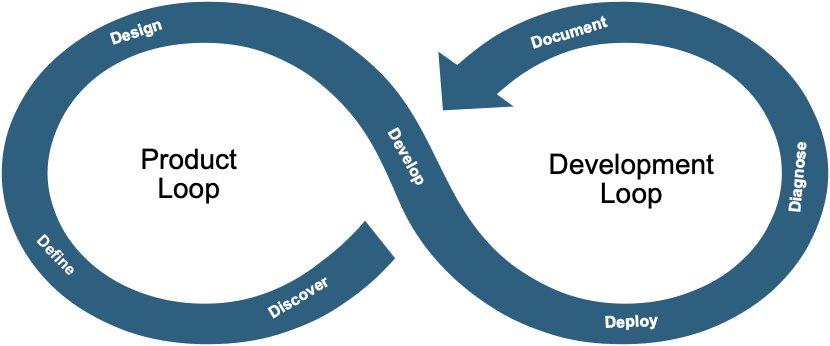
The SevenD infinity loop: Product Loop (Discover, Define, Design) flowing into the Development Loop (Develop, Document, Diagnose, Deploy)
The problem

Most builders jump straight to the code. The first few features come out fast. It feels like magic — until the agent invents components that don't exist, skips the tests, and quietly breaks what you didn't ask it to touch. The problem was never the agent. It was the missing structure around it.

SevenD is that structure — seven phases that tell an AI agent what to read, what to build, and exactly when to stop and ask. Human-AI collaboration with guardrails, not vibes.

The framework

Seven phases. Two loops. Zero guesswork.

A Product loop and a Tech loop, joined at Documentation. Phase gates block premature advancement — no Design without an approved Definition, no Deployment without Diagnostics passing.

Product Loop
01

Discovery

Identify what to build and why — before a single line of code exists.

02

Definition

Write requirements and acceptance criteria the agent can verify against.

03

Design

Lock components, interfaces, and standards so the agent stops inventing them.

The Bridge
04

Documentation — the single source of truth

Track status across every phase. One glance to know where the project stands and what's been decided.

Tech Loop
05

Development

Implement in time-boxed sprints against the approved design.

06

Diagnostics

Test for correctness and quality. Sprints close only at zero open bugs.

07

Deployment

Ship, monitor, and feed every lesson back into Discovery.

Adopt incrementally

Four levels. Start anywhere.

Pick the level that matches your project today. You can always upgrade without losing content.

1

Two files

Solo · weekend · prototype
  • Product.md
  • Tech.md
  • IDE rules included
2

Four files

Small team · real project
  • + Architecture.md
  • + Resources.md
  • + Project.md
Recommended
3

Phase folders

Complex · weekly sprints
  • 7 phase INDEX + sprints
  • reference/ docs
  • STATUS.md dashboard
4

GitHub-native

Team · CI/CD
  • Issues + Projects
  • Actions + PR gates
  • + reference/ docs
Get going in minutes

Quick start

Copy the templates, or let the Claude skill set it up with your real project details instead of placeholders.

Copy the templates

fastest

Clone, drop a level into your project, fill in the placeholders.

# Clone the repo
git clone https://github.com/Ashvinnaik/SevenD.git

# Copy the level you need
cp -r SevenD/level-1/ my-project/  # prototype
cp -r SevenD/level-3/ my-project/  # complex

Use the Claude skill

recommended

Generates files filled in with your actual project, not placeholders.

# Install the skill
cp -r SevenD/skill/ ~/.claude/skills/SevenD/

# Start a conversation
claude

# Triggers when you say:
# "set up my project with SevenD"
Open source · MIT

Give your AI agents a backbone.

Star the repo, copy a level, and ship your next feature with structure instead of vibes.